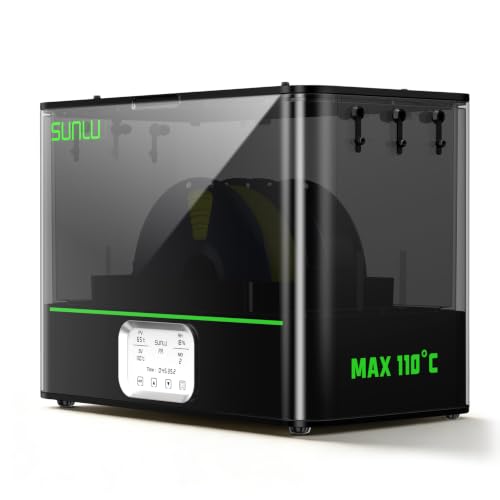
If a filament dryer’s humidity is not dropping, do not chase one universal percentage. The display reports air near one sensor, relative humidity changes with temperature, and some models deliberately limit or control what appears on screen. Verify the exact model and mode, compare readings at the same operating stage, check only maker-approved airflow and loading points, and separate a display question from a heating or fan fault.
Verify the material procedure in the manufacturer drying reference, keep storage maintenance separate in the desiccant guide, and compare the exact display boundaries on the SUNLU S4, SUNLU E2, and PolyDryer notes.
Start with the answer: the humidity number is not spool moisture
A flat, rising, or falling relative-humidity reading does not by itself prove whether the dryer works or whether the filament is dry. The sensor measures the air around it; it does not measure water inside every winding of the spool. Use the number as one observation beside temperature, mode, time, loading, and the result of the supported material procedure.
Vaisala explains that relative humidity is strongly temperature-dependent: the same moisture content can produce a lower RH as air warms and a higher RH as it cools. Compare readings only at a similar chamber temperature and operating stage. A warm-up value, steady heated value, post-cycle value, and lid-open value are not interchangeable.
Record one comparable cycle before changing anything
Write down the exact dryer model and revision, selected mode, target temperature, elapsed time, displayed temperature and RH, room conditions, spool count, reel identity, material, and whether the chamber is warming, holding, or cooling. Photograph the loading and display without opening the case. This gives the manufacturer a timeline instead of a lone percentage.
For your comparison, use the same functioning machine, similar load, same supported setting, and the same point in the cycle. Do not compare two dryers as if their sensors share the same position, airflow, range, resolution, or temperature. Change nothing electrical and do not extend the material cycle merely to force the screen toward a preferred number.
Follow the exact model’s display and control rules
On the original SUNLU FilaDryer S4, SUNLU describes a humidity-control function that starts when the chamber reaches the selected 30–50% RH threshold and stops at 25% RH. That is model-specific control behavior, not a universal target and not an instruction for the S4 Pro or another dryer. First confirm that the unit, revision, and selected mode match the documentation you are reading.
On the SUNLU FilaDryer E2, SUNLU says the humidity sensor enters protection at 80°C or above and displays below 10% RH. The maker also says original accuracy returns about 20 hours after the dryer cools to 70°C. During that documented condition, the display behavior should not be diagnosed as ordinary room-temperature sensor performance or proof of filament dryness.
PolyDryer documents a different boundary: its hygrometer does not display below 10% RH, and its published 10–30% examples came from a specific internal experiment whose result varied by power level, initial moisture, material, external environment, and drying time. A displayed floor or one maker’s experiment cannot be transferred to another chamber.
Check only approved loading, outlets, and airflow
With the unit off and handled exactly as its manual requires, confirm that the reel and approved accessories sit in their intended positions. Check only user-accessible external intakes, exhausts, filament outlets, plugs, airlocks, lid seals, and required clearances named by the maker. Confirm that nothing in the load blocks a documented air path.
Do not prop the lid open, tape over vents, drill openings, add a fan, bypass a switch, remove a guard, or open an electrical enclosure to change the reading. Do not move a consumer hygrometer into a heated chamber unless its own temperature range and the dryer maker both permit that placement. Two unmatched sensors disagreeing does not identify which one is correct.
As an Amazon Associate, we earn from qualifying purchases. Buying through our links may earn us a commission.
Comparing equipment? Review the documented limits before buying.
View SUNLU S4 on Amazon ↗A relevant option to investigate, not a diagnosis or a universal recommendation.
Separate four different failure branches
If temperature does not rise or hold as the manual describes, or the dryer shows an error, stop the cycle according to the manual and use manufacturer support; that is a heating or control concern, not an RH-target problem. If a documented fan is absent, abnormally noisy, or paired with an error, stop rather than disassembling the dryer.
If temperature and the supported cycle appear normal but RH stays flat, recheck the exact model’s display range, protection state, control mode, load, and approved airflow arrangement. If RH changes after opening or cooling, record that event; air exchange and temperature change make the value non-comparable. If the cycle completes but the print does not improve, move to material and printer diagnosis instead of repeating a hotter or longer cycle without exact-product support.
Judge the supported process, not a universal target
Use the filament manufacturer’s complete temperature-and-time pair, reel limits, and stated method. Do not stop early because RH fell, and do not keep heating because it did not reach a number copied from another dryer. A chamber display cannot certify moisture remaining inside the polymer.
After a normally functioning supported cycle, compare the same short print or observed failure under the same printer conditions. Record whether the practical result changed. Storage desiccant can help maintain an enclosed environment after preparation, but it is a separate job and does not repair a heater, fan, sensor, or wet spool by itself.
Send support evidence that isolates the problem
Contact the dryer maker when the documented display behavior, temperature control, fan behavior, or error state is not reproduced. Include the model and revision, serial or order details requested by the maker, firmware if applicable, load photograph, room conditions, selected mode and settings, timestamped temperature/RH observations, error code, and a short video only if support asks for one.
State the branch clearly: humidity reading stayed flat, the reading rose during cooling, temperature did not hold, a documented fan did not behave normally, an error appeared, or the print remained unchanged after the exact supported material process. Stop using the unit for abnormal heat, odor, smoke, condensation near electrical parts, damaged wiring, or repeated safety alarms, and follow the manufacturer’s shutdown and service instructions.
Sources and research notes
This guide synthesizes published guidance. It does not describe our own laboratory or hands-on product testing. Display, control, protection, recovery, and error behavior applies only to the named model and documented operating state.