EIBOS / AMS HEATING UPGRADE
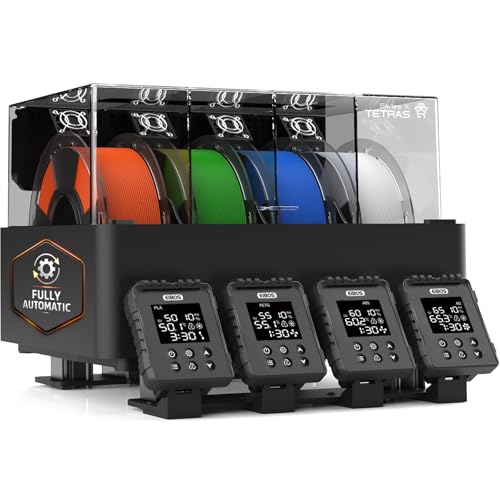
EIBOS Tetras AMS Upgrade
Add active drying to a compatible AMS with four independently controlled chambers. Requires the host AMS.
4 spoolsUp to 65°C
Check on Amazon Details & tradeoffsTHE RIGHT EQUIPMENT FOR THE JOB
Compare active AMS upgrades, desiccant, and humidity indicators without confusing their different jobs.
Check my requirements ↗CHECK / 01
An active AMS heating upgrade is equipment, not passive desiccant. Confirm the host model and any required adapter.CHECK / 02
Use a hygrometer to observe the air in the container; it does not measure the moisture content of the filament.CHECK / 03
Follow the desiccant maker’s regeneration instructions and keep loose beads in a suitable contained holder.As an Amazon Associate, we earn from qualifying purchases. Buying through our links may earn us a commission.
EIBOS / AMS HEATING UPGRADE
Add active drying to a compatible AMS with four independently controlled chambers. Requires the host AMS.

EIBOS / AMS HEATING UPGRADE
A compatible-AMS drying upgrade with four spool positions across two independent temperature zones.

Dry & Dry / STORAGE & CARE
Loose indicating silica-gel beads for refillable holders inside sealed storage.
Check on Amazon Details & tradeoffs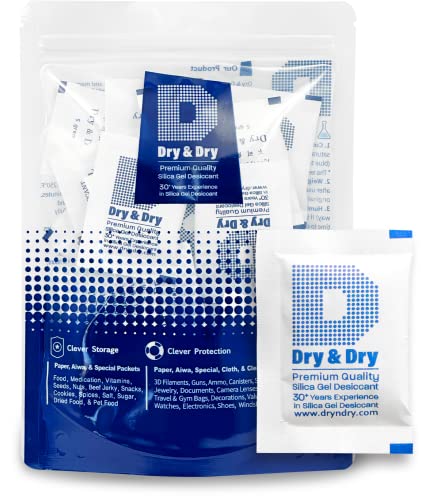
Dry & Dry / STORAGE & CARE
Small contained desiccant packets for distributing among multiple storage bags or boxes.
Check on Amazon Details & tradeoffs
Wisesorb / STORAGE & CARE
Larger contained silica-gel packets for a storage routine with fewer loose parts.
Check on Amazon Details & tradeoffs
YOOPAI / STORAGE & CARE
Small temperature and humidity displays for comparing air conditions across storage boxes.
Check on Amazon Details & tradeoffs
WWHAKO / STORAGE & CARE
Round miniature humidity displays for storage boxes with suitable mounting space.
Check on Amazon Details & tradeoffsStart with the job, not the product name. Active AMS heating upgrades, passive desiccant, and compact hygrometers answer three different questions. None is interchangeable with the others, and an air reading or indicator color does not prove that a wet spool has completed an active drying procedure.
| Accessory role | Selected options | What the retained evidence establishes | What still needs verification |
|---|---|---|---|
| Active AMS heating upgrade | EIBOS Tetras; EIBOS Dyas | Manufacturer documentation supports model-specific active heating and current host/adapter workflows. | Exact AMS generation, adapter, installation, power, reel, material, and feed path. |
| Loose indicating silica gel | Dry & Dry orange beads | The selected Amazon record identifies a loose-bead refill product. | First-party indicator reference, holder compatibility, handling, and regeneration method remain unresolved here. |
| Contained desiccant packets | Dry & Dry 5 g packets; Wisesorb 20 g packets | The selected records distinguish packet format and bundle identity. | Exact wrapper limits, quantity for the enclosure, service indicator, replacement interval, and regeneration permission. |
| Air temperature and humidity display | YOOPAI mini displays; WWHAKO round displays | A current display can describe air near its sensor under its stated operating limits. | Accuracy, stabilization, placement, and calibration evidence; it cannot measure water inside filament. |
The three desiccant and two hygrometer notes remain excluded from indexing because exact manufacturer documentation is not sufficient for a standalone recommendation. They stay visible as disclosed listing-identity records, not as independently tested reviews.
The answer to “can I dry desiccant beads in a filament dryer?” is product- and equipment-specific. Polymaker documents one procedure for its own PolyDryer system: an empty Box on the Dry Dock at power level 3 for about eight hours, with a stated orientation and color endpoint. That procedure does not validate a cycle for any of the three desiccant listings above.
Read the filament desiccant guide for the four-gate regeneration decision, the storage cornerstone for the enclosure routine, and passive storage versus active drying before treating a storage accessory as drying equipment.
Product-specific example rechecked against Polymaker's current PolyDryer FAQ ↗.
Tetras and Dyas add active heating to supported AMS hardware. Desiccants manage moisture in enclosed air, while compact hygrometers report conditions near their sensor. These are complementary roles, not interchangeable alternatives.
For an AMS upgrade, verify host and adapter compatibility. For desiccant, use product-specific handling and regeneration instructions. For a display, treat its reading as air information rather than a measurement of water inside the filament.
Open the product details and review the limitations, then check the current retailer listing for the exact revision, included parts, seller, and return terms. Specifications here come from published sources, not independent performance measurements. Where a dimension or capability could not be established, it stays unknown.
Our Finder separates documented temperature and capacity matches from products that require more verification. It does not certify safety or diagnose a printer. If moisture symptoms continue after following the maker’s drying procedure, investigate print settings and feed resistance as separate variables.
How we compare products · Manufacturer drying reference · All collections